
ML Infrastructure
FlashML
Infrastructure for production-ready model APIs
Problem
Deploying machine learning models is often significantly harder than building them. Students, researchers, and small teams may have a trained model ready for inference, but turning that model into a production-ready service typically requires learning cloud infrastructure, containers, APIs, GPU provisioning, storage systems, and deployment workflows. For many projects, infrastructure becomes a larger obstacle than the model itself.
Solution
I built FlashML, a cloud platform that allows developers to deploy machine learning models as scalable APIs through a simple upload workflow. After uploading an ONNX model, users receive a hosted inference endpoint that can be integrated directly into web, mobile, and backend applications. FlashML manages the underlying infrastructure, model storage, versioning, and inference execution, enabling teams to focus on building AI-powered products rather than operating machine learning infrastructure.
Tech Stack
Deep Dive
FlashML is built around a control plane and data plane architecture. The control plane manages users, models, authentication, uploads, and API access, while the inference layer executes deployed ONNX models through CPU and GPU runtimes.
System Architecture
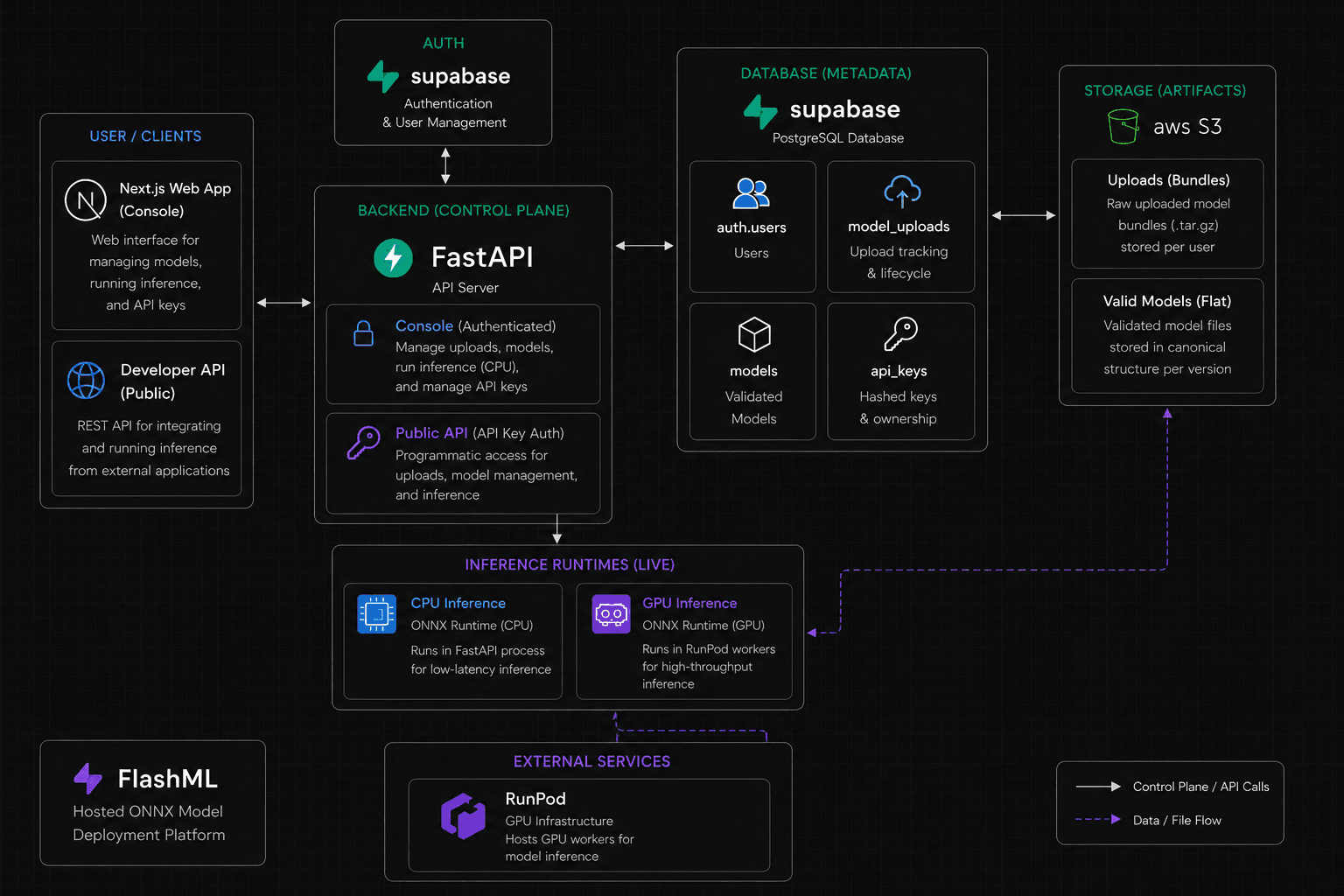
At a high level, FlashML separates control-plane responsibilities from inference execution. The control plane owns user workflows, model metadata, API keys, and upload lifecycle state. The inference layer loads validated ONNX artifacts from storage and runs them through the appropriate CPU or GPU runtime.
Core Components
User Interfaces
FlashML exposes two entry points: a Next.js dashboard and a developer API. The dashboard lets users upload models, manage deployments, test inference, and create API keys. The developer API provides programmatic access to uploads, model management, and inference.
This split keeps the console useful for manual workflows while still letting external applications integrate with FlashML through authenticated API requests.
FastAPI Control Plane
FastAPI manages authentication, upload orchestration, model validation, version management, API key management, and routing inference requests to the correct runtime.
A key design decision is that the control plane never stores large model artifacts directly. It coordinates the model lifecycle while keeping storage and execution separated.
Metadata Layer
Supabase stores metadata for users, models, uploads, and API keys. It acts as the system of record for ownership, lifecycle state, and access control.
Model artifacts are intentionally stored separately in object storage, so the relational database stays focused on metadata instead of large binary files.
Artifact Storage
S3 stores original upload bundles such as user/uploads/model-v1.tar.gz and validated model directories such as user/models/model-v1/.
Models are extracted and validated once during upload, allowing inference runtimes to load a predictable file structure instead of re-processing arbitrary user bundles at request time.
Inference Layer
The current CPU runtime uses ONNX Runtime inside FastAPI for low-latency testing and lightweight inference. The GPU runtime uses RunPod workers with ONNX Runtime GPU for higher-throughput production workloads.
This keeps the platform usable for simple CPU-backed testing while leaving a clear path for heavier models to run on dedicated GPU infrastructure.
Data Flows
Model Upload Flow
- User
- FastAPI
- Generate Presigned URL
- Direct Upload to S3
- Validate Bundle
- Extract Files
- Publish Canonical Model
- Create Model Record
The user starts an upload through the dashboard or API. FastAPI creates a presigned S3 URL so the model bundle can be uploaded directly to object storage. After upload, the backend validates the bundle, extracts the files, publishes a canonical model directory, and creates the model record that tracks ownership, versioning, and lifecycle state.
Inference Flow
- Client
- API Request
- Authentication
- Model Lookup
- Load Model
- Preprocess Input
- ONNX Runtime
- Postprocess Output
- JSON Response
A client sends an authenticated inference request with an API key. FastAPI verifies access, looks up the target model, loads the validated artifact structure, normalizes the request payload, executes the ONNX graph, postprocesses the outputs, and returns a JSON response that application code can consume directly.
Key Design Decisions
Why ONNX?
FlashML uses ONNX because it is framework agnostic, portable, and designed for efficient runtime execution. Compared with serving native PyTorch or TensorFlow models directly, ONNX is less flexible at runtime but much easier to package, validate, and deploy consistently.
Why S3 Instead of Database Storage?
Models are large binary artifacts, so storing them in the database would make the metadata layer heavier and more expensive to operate. S3 provides cheaper storage, high durability, and native support for presigned uploads.
Why Presigned Uploads?
Instead of routing browser uploads through the backend before sending them to S3, FlashML lets the browser upload directly to S3 through a presigned URL. This lowers backend bandwidth, makes uploads faster, and scales better for large model files.
Why Separate Metadata and Artifacts?
Supabase stores metadata while S3 stores artifacts. This separation keeps the architecture cleaner, lets metadata queries stay simple, and allows storage and database capacity to scale independently.
Why API Keys?
API keys let external systems call inference endpoints without requiring an interactive user session. That supports CI/CD integration, backend-to-backend inference, and production application use cases.
Challenges
Supporting Multiple Model Types
Users can upload image classification, object detection, text classification, and embedding models. FlashML handles this with task-specific validation and inference handlers instead of treating every model as the same shape of problem.
Safe Model Validation
Users upload arbitrary files, so the validation pipeline checks that required assets exist, the model structure is correct, and metadata is valid before the model can be deployed.
Large Model Files
Large uploads can overwhelm application servers if every file passes through the backend. Presigned S3 uploads move the heavy transfer path directly between the browser and object storage.